Auth & Connectivity
This guide explains how authentication works in Sumex, how your profile is created, and how to manage connected Bundles securely through the Connection Manager to reap the maximum benefits throughout your journey.
Authentication Model
Sumex does not require registration, passwords, or KYC. Instead of creating yet another account with email and password, you can simply authenticate using existing Web2 or Web3 methods. Currently, Sumex allows to log-in with Google, X, Telegram, Discord and a large variety of Web3 wallets.
There is no traditional registration form. Your first login automatically creates your profile.
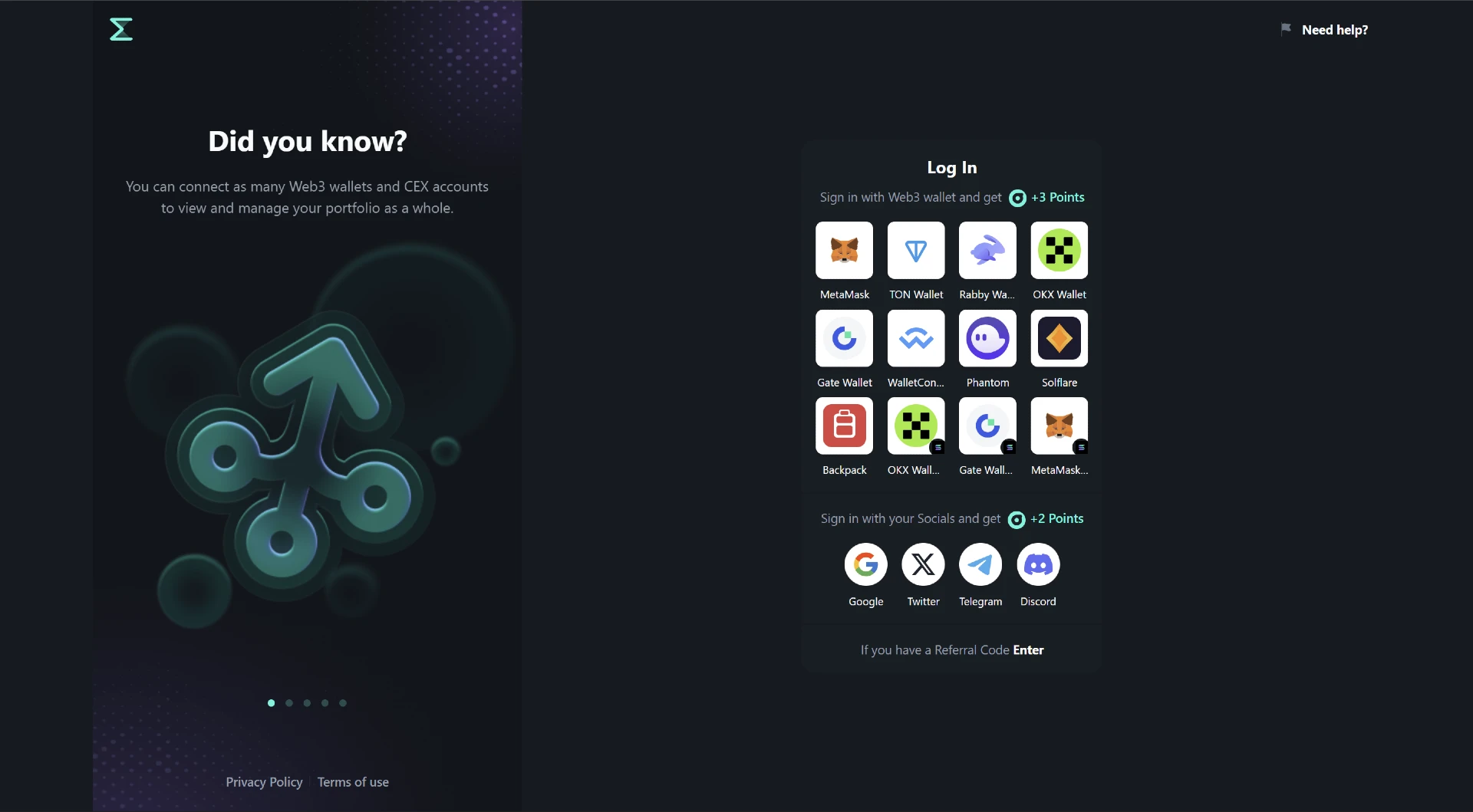
When you log in for the first time:
- A profile is automatically created.
- A unique UID (User Identifier) is assigned.
- The authentication method used becomes your first connected Bundle.
This UID represents your identity within Sumex. All future Bundles are then attached to the same profile.
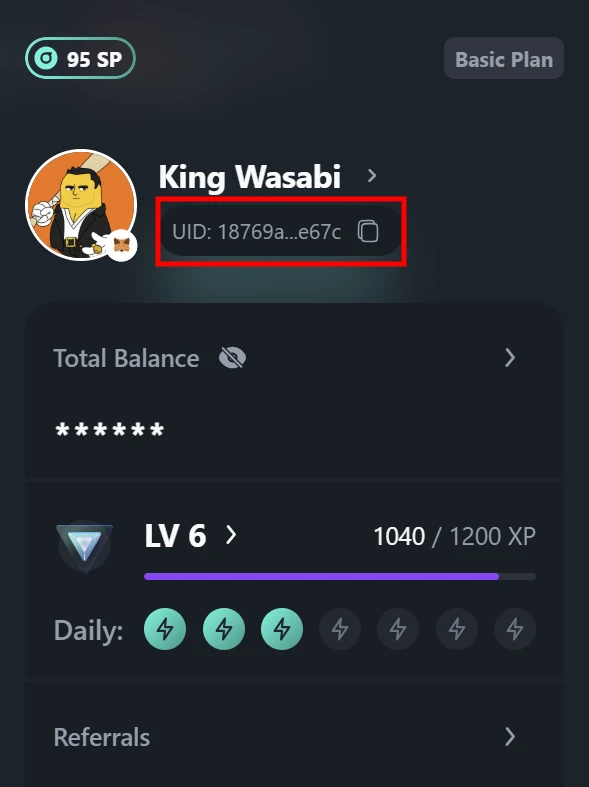
Where to find your UID?
Once logged-in click on the avatar in the top right corner to open a side panel, where you will find you profile's quick access information, including your UID.
What Is a Bundle?
A Bundle is any connected external account or source.
Bundles are split into three categories on the platforms, namely:
- DeFi - your Web3 wallets
- CeFi - you CEX accounts connected via API keys
- Socials - your social media accounts
Each Bundle connects to your UID and contributes to portfolio aggregation, analytics, trading, and rewards functionality.
You can connect multiple Bundles to the same profile, (but only one of the same type for Socials).
Adding Additional Login Methods
After your first login, you can connect additional authentication methods via:
Portfolio → Connection Manager
Any added Web2 or Web3 method becomes:
- Linked to your existing UID
- A valid way to log into the same profile
- Not a new account
This allows you to log in using different methods interchangeably while accessing the same dashboard and data.
Connection Manager Overview
The Connection Manager is where you control all of your Bundles.
To access it:
- Open Portfolio
- Navigate to Connection Manager
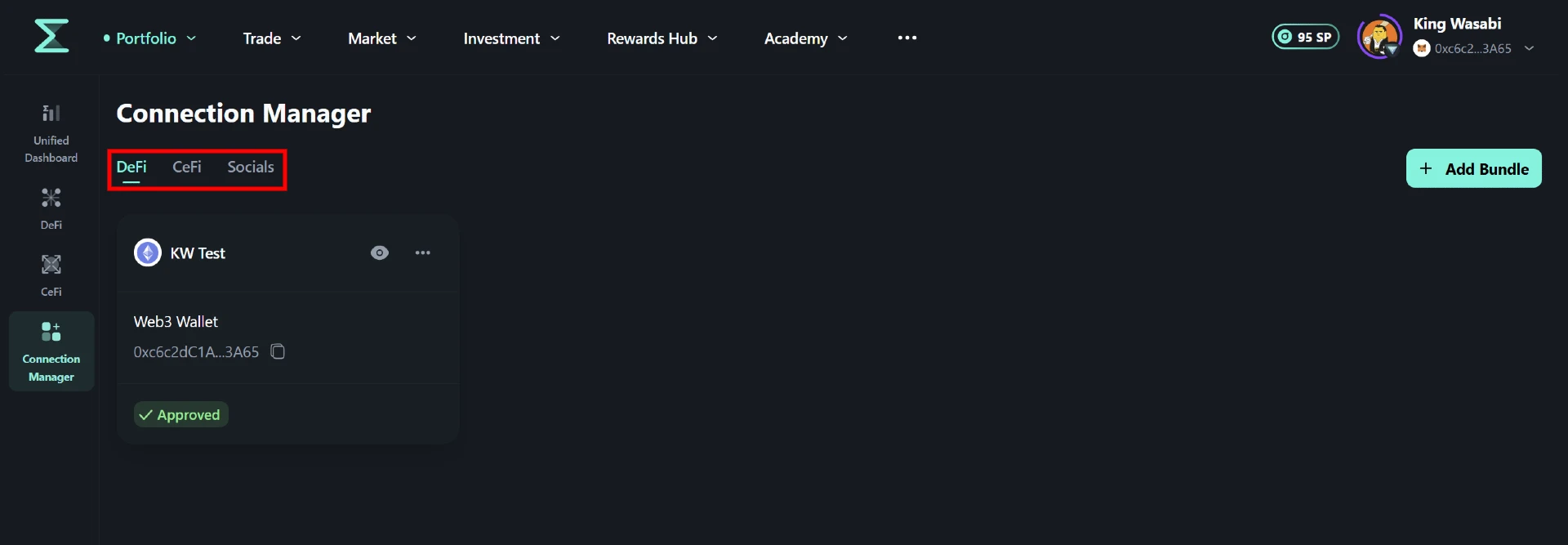
You will see three tabs: DeFi, CeFi and Socials. While they are designed specifically to surve a category of connections, they are operated in the same manner inside Sumex's Connection Manager.
Connecting new Bundles
Connecting to Sumex is simple and secure.
- Web3 wallets
- CEX accounts
- Social accounts
To start using Sumex with your Web3 wallet, you’ll first need a compatible wallet. If you don’t already have one, here are a few popular and widely supported options: MetaMask, Trust Wallet, Rabby, or other WalletConnect-compatible wallets (over 600 supported).
If you are new to this, make sure to use official extensions and apps, and never share your seed phrase or private key with anyone.
To connect it to Sumex:
- Go to the Connection Manager located in the Portfolio section of your Sumex dashboard.
- Select DeFi tab and press “Add Bundle” button, then select your wallet type (e.g., MetaMask, WalletConnect, etc.).
- Your wallet will prompt you to sign a message — this is a standard industry login method used only to verify that you own the address. This does not grant Sumex access to your funds or allow it to make transactions.
- Once signed, your wallet is connected and your assets will begin syncing with your portfolio.
You remain in full control — you can disconnect your wallet at any time via the Connection Manager, or directly through your wallet interface.
To connect your CEX account to Sumex, you first need to have an active account with the respective exchange (e.g., OKX, Bybit, BingX, Gate, etc.). If you haven’t registered yet, we recommend using our referral link to create an account and receive potential bonuses.
Once your account is ready:
- Log in to your exchange account and navigate to the API Management section.
- Create a new API key and configure the access permissions:
- A read-only key allows Sumex to track and display your portfolio and trading history.
- A trading-enabled key (with "write" access) enables you to trade directly from the Sumex interface.
- Select which asset types or sub-accounts the key should access (e.g., Spot, Futures, Earn).
- Copy the API key and Secret key provided by the CEX.
Next, return to Sumex:
- Go to the Connection Manager located in the Portfolio section of your Sumex dashboard.
- Select CeFi tab and press “Add Bundle” button, then choose the required exchange
- Paste the API key and secret in the appropriate fields, along with the other necessary fields.
- Confirm the connection.
For portfolio & performance tracking:
- Read access only
For trading via Sumex:
- Read + Trade access
Withdrawal access is not required and should not be enabled.
If withdrawal permissions are detected, the system will display a warning in the Connection Manager.
- Go to the Connection Manager located in the Portfolio section of your Sumex dashboard.
- Select the Socials tab and press the “Add Bundle” button, then choose the social platform you wish to connect (e.g., Google, X, Telegram, Discord).
- A new tab will open prompting you to authenticate and approve the connection between your social account and the Sumex application.
- Once approved, return to Sumex — your connected account will appear in the Socials tab as an active Bundle and can be used as a login method.
This connection only verifies your account and enables authentication. It does not grant Sumex control over your social media account or the ability to post, modify, or manage it.
You remain in full control — you can disconnect your social account at any time via the Connection Manager, or recall the access directly from the social media application at any point.
Once connected, Sumex will be able to track your portfolio, provide performance analytics, and optionally execute trades on your behalf (if trading access was granted). You remain in control of the connection at all times and can edit or revoke access whenever needed by deleting a connected bundle in the Connection Manager, or directly in your Web3 wallet / CEX account. Sumex is fully non-custodial: we never store your seed phrase, private key, credentials or assets. Your keys, your coins — always.
Managing your Bundles
Once a Bundle is connected, it will appear in the appropriate tab of the Connection Manager and there are a few additional actions you can do. To access those option, you will be required to click on the 3 dots at the top right corner of the Bundle's card to view additional options.
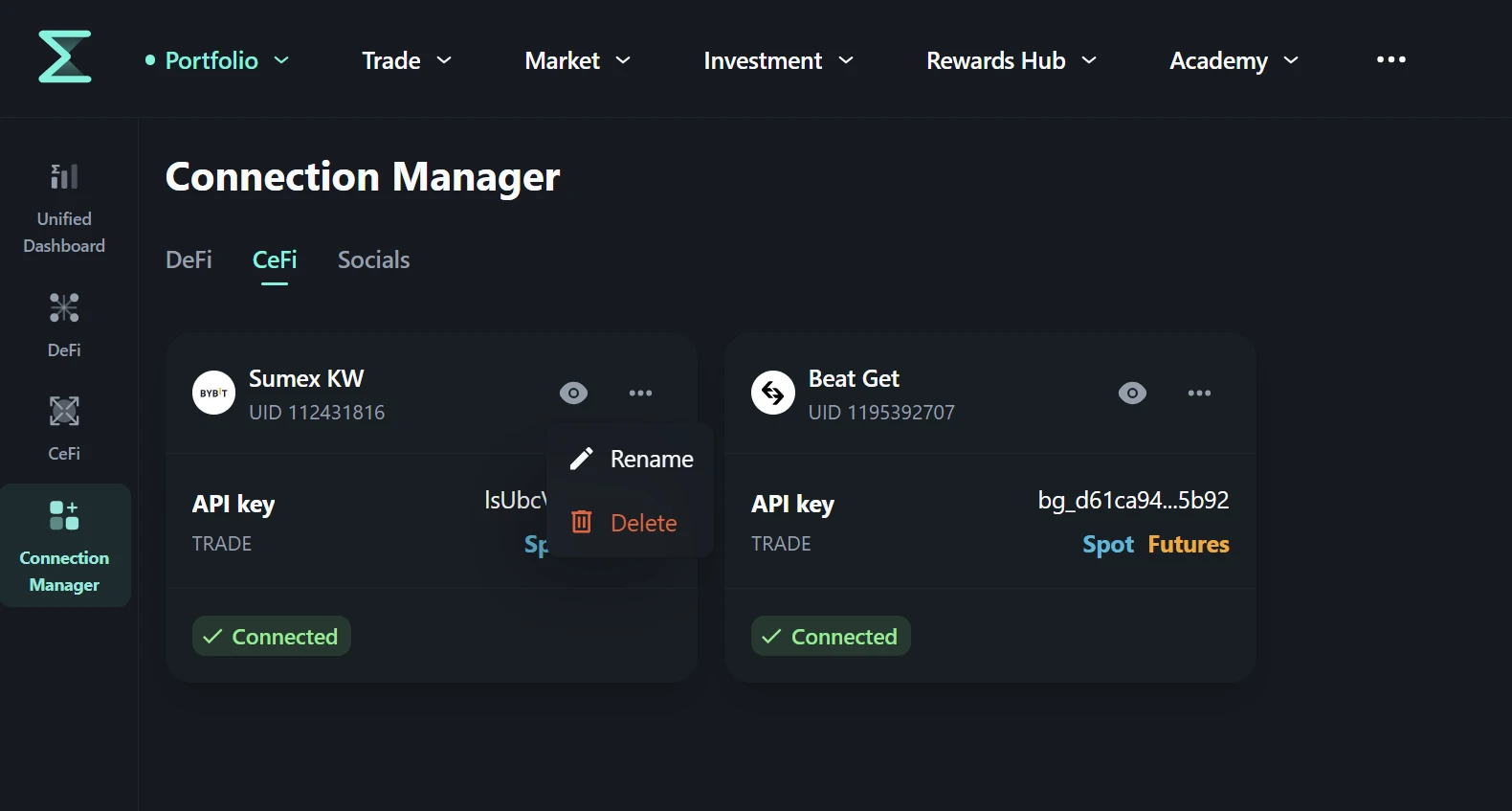
Naming Bundles
During or after the connection, you can assign a custom name to any Bundle. These names are designed solely for personal use and do not appear publicly anywhere. Additionally, you can rename your Bundle at any point, for easier navigation. Examples:
- "Spot Trading — Bybit"
- "HODLing Wallet"
- "Rewards Account"
Naming helps distinguish multiple wallets or exchange accounts within the Unified Dashboard too.
Deleting Bundles
To remove a Bundle:
- Click the three-dot menu next to the Bundle
- Select Delete
The Bundle will immediately disconnect from your profile.
After deleting a Web3 wallet or a Social Bundle, it enters a 24-hour cooldown period. During this time, the same Bundle cannot be connected to any profile.
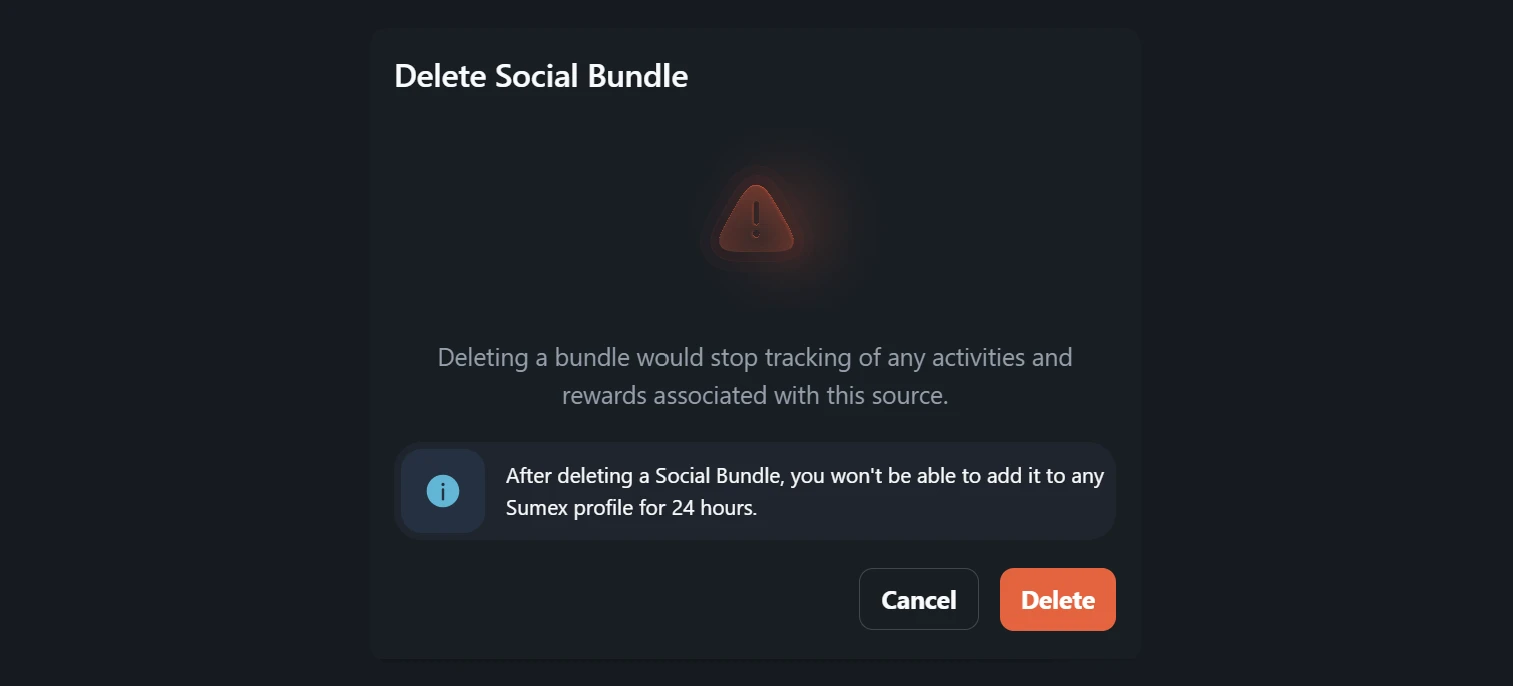
This mechanism protects against abuse of Rewards Hub mechanics and multi-account exploitation.
CeFi API Bundles are not subject to this cooldown.
Show/Hide Bundle
While your private information is not shared on the platform at all, the general information and the related performance metrics can be visible in your public profile. However, to further allow users control the level of privacy, there is an option to make any Bundle private, therefore hiding any related information like assets breakdown, trading performance, investment protocols, etc. from the public view completely.
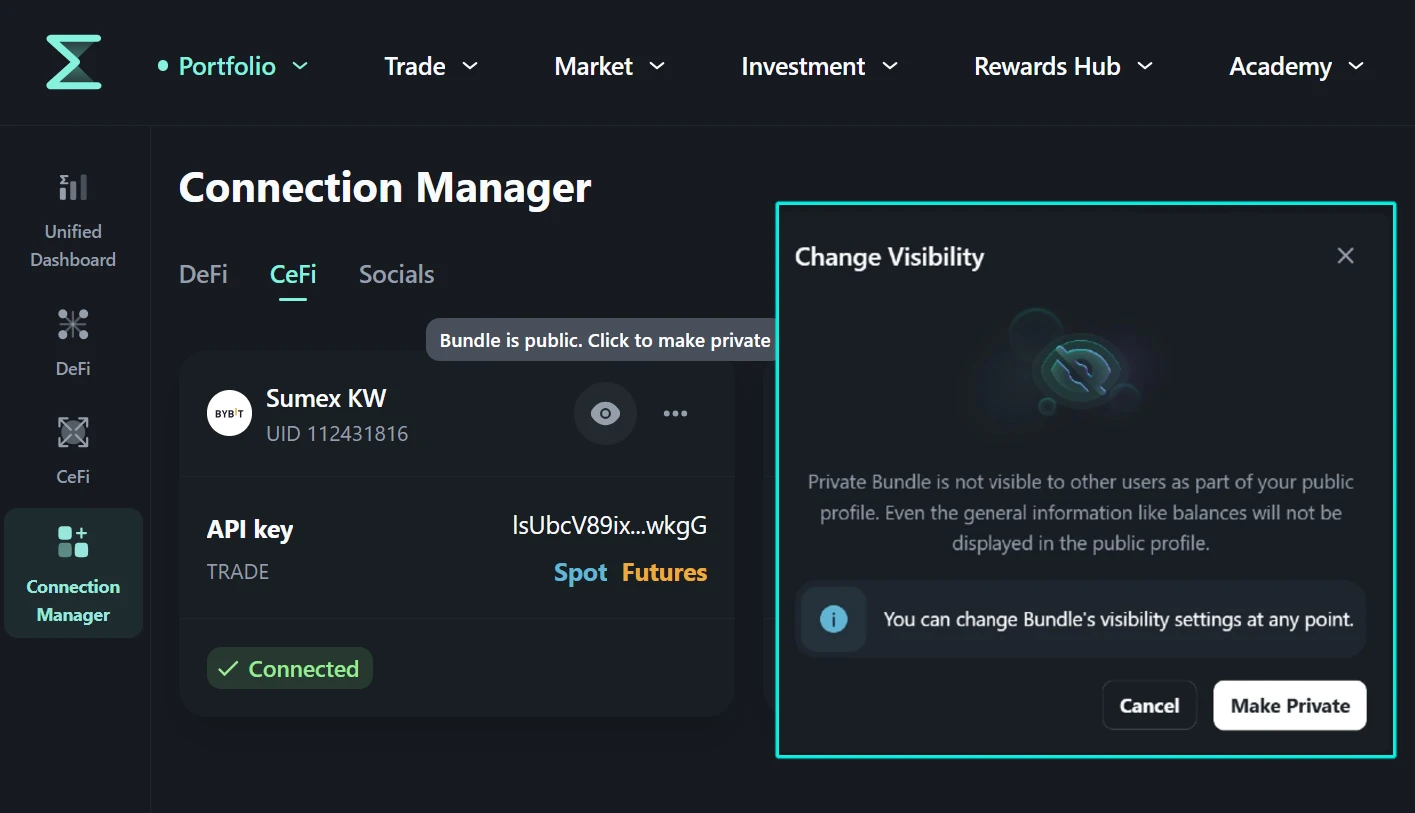 In order to make a Bundle private, all is required is to switch it's visibility by clicking on the eye icon located on the Bundle's card.
Security & Data Handling
At Sumex, our aim is to provide not only a convenient and simple portfolio management solution, but also to provide a safe and secure environment to operate it. That means that we pay additional attention to how the information is handled and the access provided by the users.
Sumex uses industry-standard OAuth protocols for Web2 authentication. No passwords are created or stored by Sumex, and only the minimal data strictly required for platform operation is retained. No personal data is ever shared with third parties.
For Web3 wallet connections, only a basic signature is required to verify ownership of the address. Sumex does not request access to funds, does not request transaction approvals, and never asks for private keys or seed phrases. These are never collected or stored.
If at any point during the connection process your wallet requests permissions beyond a standard authentication signature — especially permissions involving fund access or token approvals — do not approve the request, as this may indicate a compromised interface or malicious attempt.
CEX accounts are connected using standard API key practices. API credentials are encrypted, internally segmented, and stored with additional encoding layers. Withdrawal permissions are not required and should not be enabled. To use portfolio tracking and performance analytics, a read-only API key is sufficient. For trading through Sumex, trade permissions may be enabled, but withdrawal access remains unnecessary. If withdrawal permissions are mistakenly granted, the Connection Manager will flag this with a warning. Users retain full control and may revoke API access at any time
Access to any Bundle can be revoked without limitation. Within Sumex, this can be done by deleting the Bundle in the Connection Manager. Alternatively, API keys can be deleted directly inside the exchange, and Web3 wallet connections can be revoked through the wallet application, browser extension, Revoke.cash app, or similar tools. You remain in full control of all connections at all times.
Sumex follows a strict data minimization principle. We store only the minimum information required to operate the platform, provide Unified Dashboard analytics, and power Rewards Hub mechanics. Sumex does not custody assets, does not store private keys, and does not control user funds.